Architecture for operators
What runs where, what talks to what, and what you must keep safe. For code-level detail see the developer documentation.
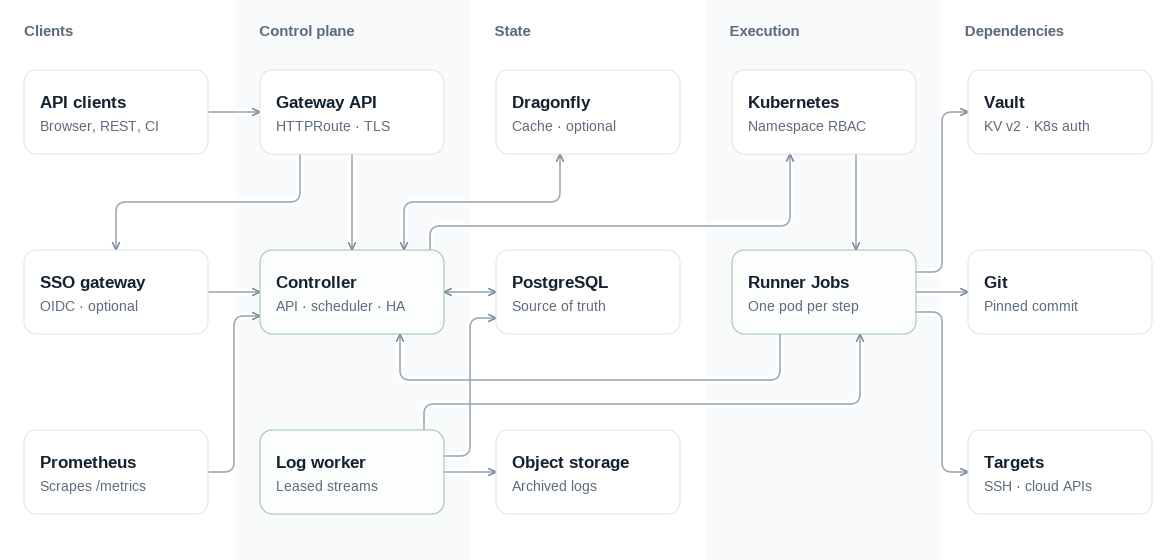
Arrows point from the caller; open the image for full size. The site's architecture view traces the same graph flow by flow.
Components
| Component | Kind | Count | Role |
|---|---|---|---|
| Controller | Deployment <release> |
1, or ≥2 in HA | Web UI and API, scheduler, maintenance (schedules, retention, cleanup), Git sync, Terraform state backend |
| Log worker | Deployment <release>-log-worker |
1 or more | Copies runner pod output into PostgreSQL and, optionally, object storage |
| Runner | Job per step, created on demand | up to maxParallel |
Runs Ansible, Bash or Terraform for one step |
| PostgreSQL | External (production) or bundled StatefulSet (labs) | — | The only source of truth |
| Vault KV v2 | External | — | Credential values |
| Cache | External Dragonfly/Valkey/Redis (optional) | — | Speeds up host catalogue, counts and listings |
| Object storage | External S3-compatible (optional) | — | Long-term runner output |
The chart creates the controller and log-worker Deployments, the Service on port 8000, ServiceAccounts <release>-controller, <release>-runner and <release>-log-worker, namespace-scoped Roles, optionally an Ingress or HTTPRoute, a NetworkPolicy and a PodDisruptionBudget. It does not create PostgreSQL (in production), Vault, the cache, object storage, DNS, certificates or the Gateway.
What each component may do in Kubernetes
| ServiceAccount | Permissions in the Liftway namespace |
|---|---|
<release>-controller |
Jobs: create, get, delete, patch · ConfigMaps, Secrets: create, get, patch, delete · Pods: list · Pod logs: get |
<release>-log-worker |
Pods: list · Pod logs: get · Jobs: read |
<release>-runner |
Nothing; its Kubernetes token is not mounted. A projected token with audience vault is used only to sign in to Vault |
Runner Jobs are created in the same namespace as the controller. Nothing is cluster-scoped.
Where data lives
| Data | Lives in | Losing it means |
|---|---|---|
| Projects, inventories, templates, workflows, users, roles, settings | PostgreSQL | Losing your configuration |
| Runs, step states, audit events, sessions | PostgreSQL | Losing history and signed-in sessions |
| Recent runner output (hot tail) | PostgreSQL | Losing live and recent output |
| Archived runner output | S3 bucket (if enabled) | Losing old output |
| Terraform plans, lock files, managed state and versions | PostgreSQL, encrypted | Losing infrastructure state |
| Terraform encryption key | Kubernetes Secret / your secret manager | Encrypted plans and state become unreadable |
| Credential values | Vault | Credentials must be entered again |
| Cache | Dragonfly/Valkey/Redis | Nothing; reads fall back to PostgreSQL |
| Runner Jobs, pods, ConfigMaps | Kubernetes | Nothing after capture; they are temporary |
Back up PostgreSQL, Vault and the encryption key — and the bucket if you use one. See Backup, upgrade and recovery.
Request and execution paths
A launch. The request reaches any controller replica. The controller resolves the template, saves the run snapshot, and reserves a runner slot in PostgreSQL under a short lock. Outside that lock it creates a Kubernetes Job with a stable name, so a restart never launches a step twice. The runner pod reads its secrets from Vault, checks out the pinned commit and runs.
Output. A log worker leases the step's output stream, reads the pod's log through the Kubernetes API and writes it to PostgreSQL. With S3 enabled, everything but the most recent lines moves to the bucket as compressed chunks. The UI reads both through the controller.
Terraform. Plan and apply pods call back to the controller's internal URL with a short-lived, job-scoped capability for state, plans and outputs. That is why runners must reach the controller on port 8000.
Sign-in. Password sessions are checked by the controller. With SSO, an identity gateway in front of /api/auth/sso runs the OIDC flow and hands the controller an ID token.
Network flows to allow
| From | To | Port / protocol | Needed for |
|---|---|---|---|
| Gateway/Ingress data plane | Controller | 8000/TCP | UI and API |
| Runner pods | Controller | 8000/TCP | Terraform state and plans |
| Controller, log worker | Kubernetes API | 443/TCP | Jobs, pods, logs |
| Controller, log worker | PostgreSQL | 5432/TCP | Everything |
| Controller, log worker | S3 endpoint | 443/TCP | Archived output (if enabled) |
| Controller | Cache | 6379/TCP | Optional cache |
| Controller, runners | Vault | 8200/TCP or 443 | Credentials |
| Controller, runners | Git servers | 443 or 22/TCP | Sync and checkout |
| Runners | Targets and cloud APIs | your SSH and HTTPS ports | The automation itself |
| Runners | Galaxy / your mirror | 443/TCP | collections/requirements.yml |
| Prometheus | Controller | 8000/TCP | /metrics |
The chart's NetworkPolicy covers only ingress to the controller: from the namespace you name in networkPolicy.ingressNamespaceSelector (where your gateway's data-plane pods run) and from runner pods. Egress is not restricted by the chart; restrict it with your platform's policies (for example Cilium) according to the table above.
Trust boundaries
- Runners are as trusted as the code they run. Every runner uses the same Kubernetes ServiceAccount and the same Vault reader role. A playbook author can read anything that role can read. Scope the Vault reader policy to the smallest prefix you need.
- The local executor is not isolated — it runs inside the controller.
- Roles are not tenancy. Someone who can both edit and launch an automation can make it use its credentials however they like. See Limits and boundaries.
- The controller can create and read Secrets in its own namespace (it stores Terraform capabilities there). Keep unrelated Secrets out of Liftway's namespace. Runners get no Kubernetes API access at all.